


Someone Sent You a .parquet File
You got an email, a Slack message, or a download link. The file ends in .parquet. You double-click it. Nothing happens. Or your computer asks you which program to use, and none of the options make sense.
You're not alone. This is one of the most common questions people run into when they start working with data teams, analytics exports, or cloud platforms like AWS, Google BigQuery, or Snowflake.
Parquet files aren't meant to be opened in Excel or Notepad. They're a compressed, column-based format built for speed and efficiency. Great for databases and data pipelines. Not so great if you just want to see what's inside.
The good news: you can open any Parquet file in your browser in about 10 seconds. No software to install, no code to write.
What Is a Parquet File, Exactly?
Think of a Parquet file like a super-compressed Excel spreadsheet. It has rows and columns, just like any table. But unlike a CSV or Excel file, it stores data in a way that's optimized for large datasets and fast queries.
A CSV file that's 500 MB might be only 50 MB as a Parquet file. Same data, ten times smaller. That's why data engineers love it.
The downside is that you can't just open it with the tools most people have on their computer. Excel doesn't support it. Google Sheets doesn't either. Even most text editors will show you a wall of garbled binary characters if you try.
That's where an online Parquet viewer comes in.
How to Open Your Parquet File (Step by Step)
Step 1: Go to parquetreader.com.
Step 2: Drag your .parquet file onto the page, or click to browse and select it.
Step 3: That's it. You'll see the column names, data types, and a preview of the first rows within seconds.
No sign-up. No install. No waiting.
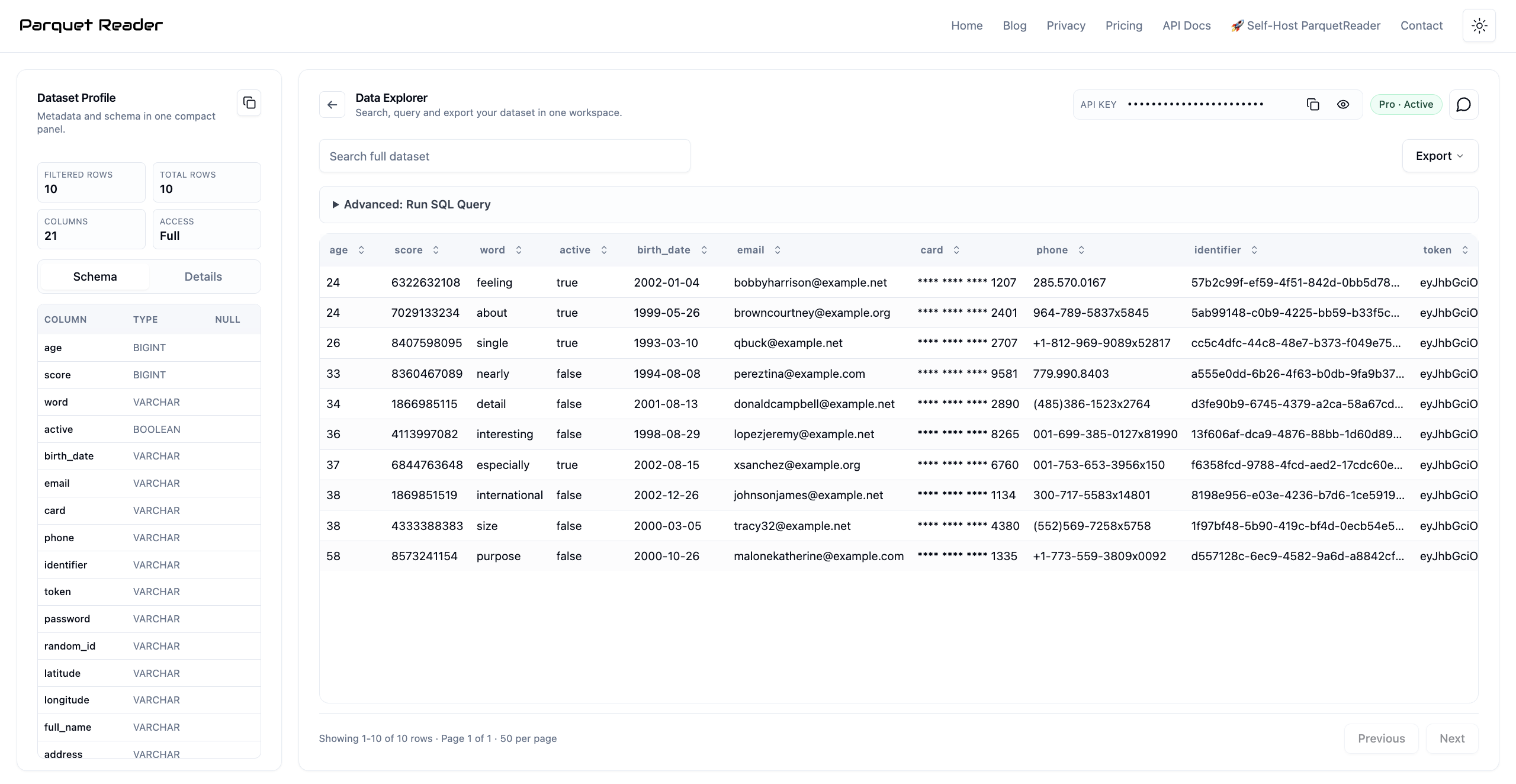
A Parquet file opened in ParquetReader, showing schema and data preview.
What You Can Do Once It's Open
Opening the file is just the start. Once your Parquet file is loaded, you can actually work with the data:
See the schema. The left panel shows every column name and its data type (text, number, date, boolean). This is useful when you need to understand what's in the file before doing anything else.
Browse the data. Scroll and page through the rows, check if the data looks right, spot any obvious issues. Reading the whole file is free — there is no row limit.
Search for something specific. Looking for a particular customer, transaction, or record? Use the search bar to find it across all columns.
Sort by any column. Click a column header to sort ascending or descending. Handy when you want to find the largest values, most recent dates, or alphabetical order.
Run SQL queries. If you know a bit of SQL, you can run full queries on your data. Things like filtering, grouping, counting, and aggregating. All in the browser.
Export to CSV, JSON, or Excel-friendly formats. Need to send the data to someone who doesn't know what Parquet is? Export it as CSV and they can open it in Excel like normal.
"But I Just Need to Convert It to CSV"
This is probably the most common thing people want to do. You received a Parquet file, but you need it as a CSV so you can open it in Excel or Google Sheets.
In ParquetReader, the conversion takes three clicks:
1. Upload your Parquet file.
2. Click the Export button.
3. Choose CSV. Done.
The CSV download starts immediately. Open it in Excel, share it with your team, import it into whatever tool you need. The data is identical, just in a format that more tools understand.
You can also export as JSON if you need the data for an API or a web application. Or export as Parquet again after filtering, if you only need a subset of the original file.
For a detailed walkthrough, check the Parquet to CSV conversion guide.
Why Did They Send Me a Parquet File in the First Place?
Fair question. If CSV works fine for most people, why would anyone send you a Parquet file instead?
A few common reasons:
Your data team exports from a data warehouse (BigQuery, Snowflake, Redshift) and Parquet is the default output format. It's not that they chose to make your life harder. It's just how these systems work.
The file is large. A 2 GB CSV might be 200 MB as Parquet. Sending it as Parquet saves time, bandwidth, and storage. If they sent you the CSV version, your email would probably reject it.
Parquet preserves data types. In a CSV, everything is text. A number, a date, a boolean: all just characters in a file. In Parquet, a date stays a date, a number stays a number. That matters when accuracy counts.
So it's not a weird or obscure format. It's actually the industry standard for moving large datasets around. You're just seeing it for the first time because data is becoming part of everyone's job, not just engineers.
Common Questions About Parquet Files
Can I open a Parquet file in Excel?
Not directly. Excel doesn't support the Parquet format. You need to convert it to CSV first, which you can do for free at parquetreader.com.
Is it safe to upload my Parquet file to an online tool?
With ParquetReader, your file is processed in a temporary session and never stored permanently. There's no account, no file history, and no way to access your data after the session ends. For extra control, there's a self-hosted version you can run on your own servers.
How big can the Parquet file be?
Most files load in seconds, even at 1 GB or more. The limit depends on your browser's available memory, but for typical business data exports, this won't be an issue.
Can I open multiple Parquet files at once?
Currently you can open one file per session. If you have multiple files, you can open them one at a time and export each as CSV.
What if my file has millions of rows?
You can read, page through, search, sort and query all of them for free. Exporting the result needs a Day Pass, which unlocks exports for 24 hours.
Do I need to know SQL to use ParquetReader?
No. You can browse, search, sort, and export without writing any SQL. The SQL feature is there if you want it, but it's completely optional.
You Shouldn't Need a Data Engineer to Open a File
Parquet files are everywhere now. They show up in analytics exports, data warehouse downloads, machine learning datasets, and open data portals. And most of the time, they land in the inbox of someone who has never heard of the format.
That shouldn't be a blocker. You don't need Python. You don't need to install anything. You don't need to bother your data team.
Open ParquetReader, drop your file in, and see what's inside.