

How to Open a Large CSV File Online (Without Excel or Python)
Your CSV Is Too Big. Now What?
You double-click a CSV. Excel hangs for 40 seconds, then shows a million rows. Or worse, it silently truncates your data at row 1,048,576 and pretends everything is fine.
This happens every day to analysts, engineers, ops teams, and anyone who receives data exports from tools like Salesforce, Stripe, Google Analytics, or internal databases.
The file is too big for Excel. You don't have Python set up. You just want to see what's in the file, search for something specific, or pull out the rows you actually need.
That's the problem ParquetReader solves. And yes, it handles CSV too.
Why Excel Breaks on Large CSV Files
Excel has a hard row limit of 1,048,576 rows. If your CSV has more, Excel drops everything beyond that limit. No warning, no error. Just missing data.
Even below that limit, files over 50-100 MB become painfully slow. Scrolling lags, filtering freezes, and sorting can take minutes. On older machines or laptops, anything past 200,000 rows is basically unusable.
Google Sheets is worse: it caps at 10 million cells total. A 50-column export hits that ceiling at just 200,000 rows.
The usual workaround is writing a quick Python script with pandas. But that means setting up a Python environment, installing packages, writing code, and debugging. All just to look at a file. For many people, that's not an option.
Open Your CSV in the Browser, No Setup Needed
With ParquetReader, you upload your CSV file and immediately see the schema (column names, data types) plus a preview of your data.
There's no software to install, no account required for basic exploration, and your file stays in your browser session. Nothing gets stored permanently.
It handles millions of rows in seconds, not minutes.
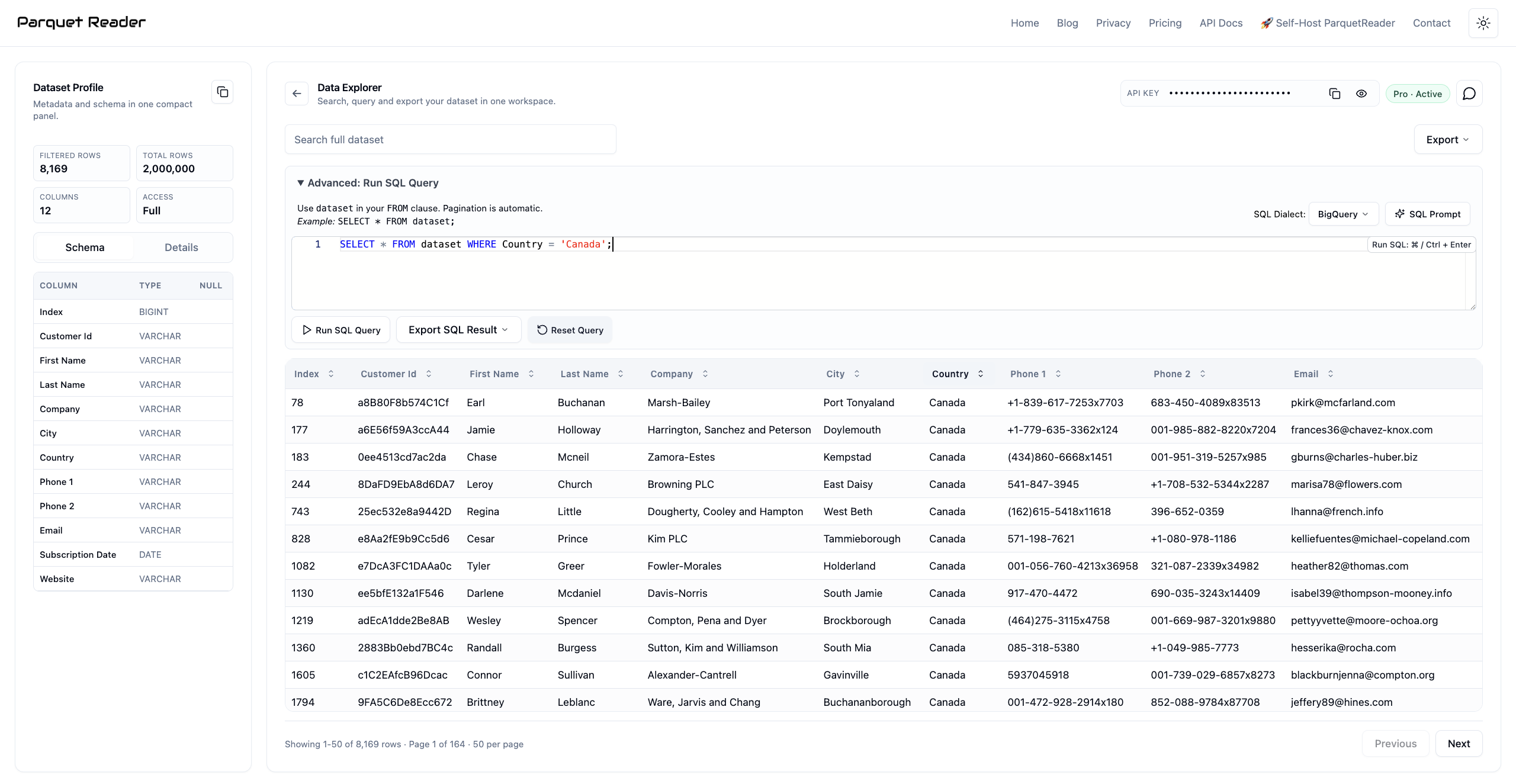
A 2-million-row CSV loaded in ParquetReader.
It doesn't matter if your CSV is 10 MB or 2 GB. The workflow stays the same: upload, inspect, explore.
Search, Sort, and Filter Without Writing Code
Once your file is loaded, you can search across all columns, sort by any field, and page through your entire dataset.
Need to find a specific customer ID in a 3-million-row export? Type it in the search bar. Want to see all rows where the amount exceeds 10,000? Sort the column descending and scan the top.
In Python, that would be a df[df['amount'] > 10000] filter, plus all the setup time before you even get there. In ParquetReader it takes five clicks.
For most day-to-day data tasks, you don't need a programming language. You need a fast viewer that lets you ask simple questions and get answers.
Run SQL Queries on Your CSV
This is the part most people don't expect. ParquetReader exposes your uploaded CSV as a queryable dataset table, and you can run full SQL against it.
A few examples that come up all the time:
SELECT * FROM dataset WHERE status = 'failed' AND created_at > '2026-01-01'
SELECT category, COUNT(*) as total, AVG(amount) as avg_amount FROM dataset GROUP BY category ORDER BY total DESC
SELECT * FROM dataset WHERE email LIKE '%@gmail.com' AND country = 'NL'
If you've ever written SQL in a database, you already know how to use this. The only difference is that your data source is a CSV you dragged into a browser tab 10 seconds ago.
No database setup. No connection strings. No schema migrations. Just SQL on a file.
Export the Rows You Actually Need
After filtering or querying your CSV, you can export the result. Not the raw file, but the exact subset you selected.
Export formats include:
- CSV for sharing with colleagues or importing into other tools
- JSON for feeding into APIs, scripts, or web applications
- Parquet for analytics pipelines, data lakes, or faster downstream processing
That makes ParquetReader a quick ETL step too: upload a messy CSV, query out what you need, export a clean file. No pipeline, no terminal.
How People Actually Use This
Finance team receiving a bank export: A 400 MB transaction CSV with 2 million rows. Excel can't open it. In ParquetReader, the team searches by date range and transaction type, then exports a filtered CSV with only the rows they need for reconciliation.
Marketing analyst checking ad performance: A Google Ads export with 800,000 rows across 60 columns. Instead of scrolling through a wall of data, they run SELECT campaign, SUM(spend), SUM(conversions) FROM dataset GROUP BY campaign ORDER BY SUM(spend) DESC and get a clean summary in two seconds.
Developer debugging a data pipeline: A staging CSV with unexpected nulls. They run SELECT * FROM dataset WHERE user_id IS NULL to find the broken records, export them as JSON, and share the specific failure cases with the team.
Operations manager tracking inventory: A weekly warehouse export with 500,000 SKU records. Sort by stock level, filter for items below reorder threshold, export a focused CSV for the purchasing team. No formulas, no pivot tables.
Not Just CSV: 10 Formats in One Tool
ParquetReader started as a Parquet file viewer, but it now supports 10 input formats: Parquet, CSV, JSON, JSONL, Excel (.xlsx), Avro, ORC, Feather, GeoJSON, NetCDF, and Arrow/IPC.
If you regularly deal with mixed file formats (a Parquet export from one system, a CSV from another, an Excel sheet from a colleague), you can open them all in the same tool with the same SQL interface.
You can also convert between formats. Got a CSV that needs to be Parquet for your data lake? Upload, query if you want, and export as Parquet. Done.
See the full list of supported conversions in the conversion guide.
Privacy First: Your Data Stays Yours
One thing worth mentioning: ParquetReader doesn't store your files. Your data is processed in a temporary session and gets discarded after.
That matters if you're working with customer data, financial records, PII, or anything your compliance team would flag. There's no account linking your uploads to an identity, no file history, and no analytics on your content.
For teams that need more control, there's a self-hosted version that runs on your own infrastructure.
Free to Read, Paid to Export
You can read every row, inspect the full schema, and run SQL over the whole dataset. Completely free, no sign-up.
When you need to export that data — the full file or a query result — a Day Pass or Pro subscription unlocks it. The Day Pass is a one-time purchase. No recurring charge, no subscription to forget about.
Most people start by reading the file for free to check if the tool fits their workflow. If it does, the upgrade pays for itself before you finish your first coffee.
Stop Fighting Your Tools
A CSV file shouldn't require a computer science degree to open. It shouldn't crash your laptop, cut off your data, or send you down a 30-minute Python rabbit hole.
Open ParquetReader, drop your file in, and get to work.
Frequently Asked Questions
What is the maximum CSV file size ParquetReader can handle?
There is no hard limit. Users regularly open files over 1 GB with millions of rows. Performance depends on your browser and available memory, but most files load in seconds.
Can I run SQL on a CSV file without setting up a database?
Yes. ParquetReader lets you run full SQL queries directly on any uploaded CSV. Your file becomes a queryable table called dataset the moment you upload it. No database, no install, no config.
Is my data stored on a server?
Your file is processed in a temporary session. Nothing is stored permanently. There's no account, no file history, and no way to retrieve your data after the session ends.
Can I export just a subset of my CSV?
Yes. Run a SQL query or use the search and filter tools to narrow down your data, then export only the matching rows as CSV, JSON, or Parquet.
Does it work with files that have more than 1 million rows?
Yes. Unlike Excel, which cuts off at row 1,048,576, ParquetReader has no row limit. Files with 5, 10, or 20 million rows work the same way.
What other file formats are supported besides CSV?
ParquetReader supports Parquet, CSV, JSON, JSONL, Excel (.xlsx), Avro, ORC, Feather, GeoJSON, NetCDF, and Arrow/IPC.